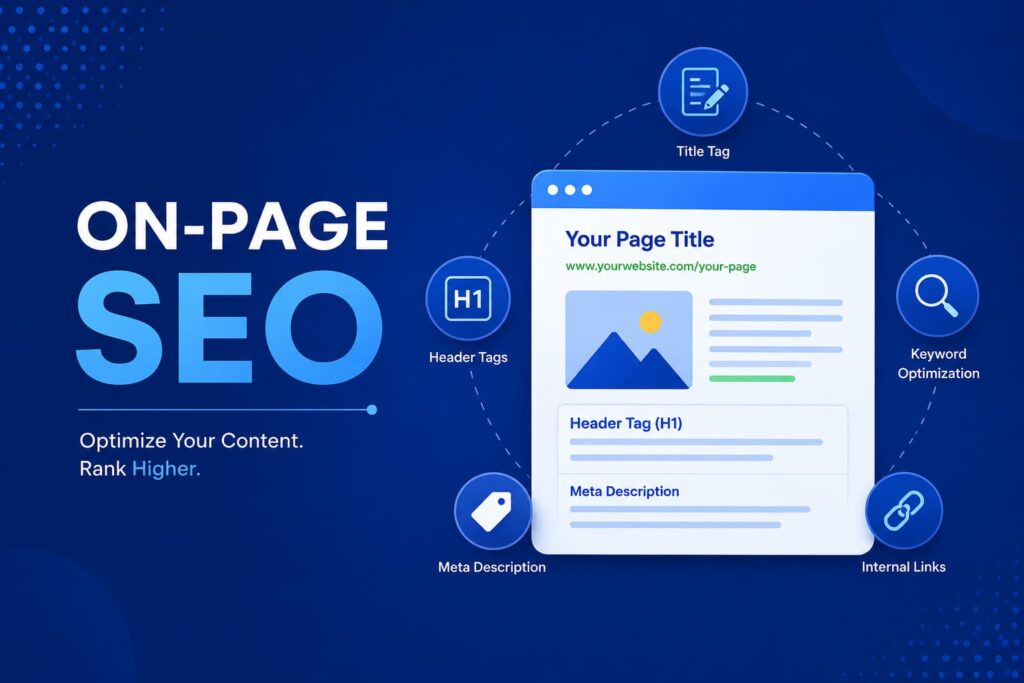

Search engine optimization has changed dramatically over the years, but one thing remains constant—on-page SEO is the foundation of every successful website. Whether you own a business website, run a personal blog, or manage an online store, optimizing your pages helps search engines understand your content while providing a better experience for visitors.
Many website owners focus only on building backlinks, forgetting that poor on-page optimization can prevent pages from ranking even with quality backlinks. Search engines analyze hundreds of signals on every webpage, including titles, headings, keywords, page speed, mobile usability, content quality, and internal links.
Think of your website like a well-organized library. Without labels, categories, and proper navigation, even the best books become difficult to find. On-page SEO acts as those labels, making your content easy for both users and search engines to understand.
This comprehensive guide covers everything you need to know about on page optimization and provides a practical on page SEO checklist you can follow for every page you publish.
What Is On-Page SEO?
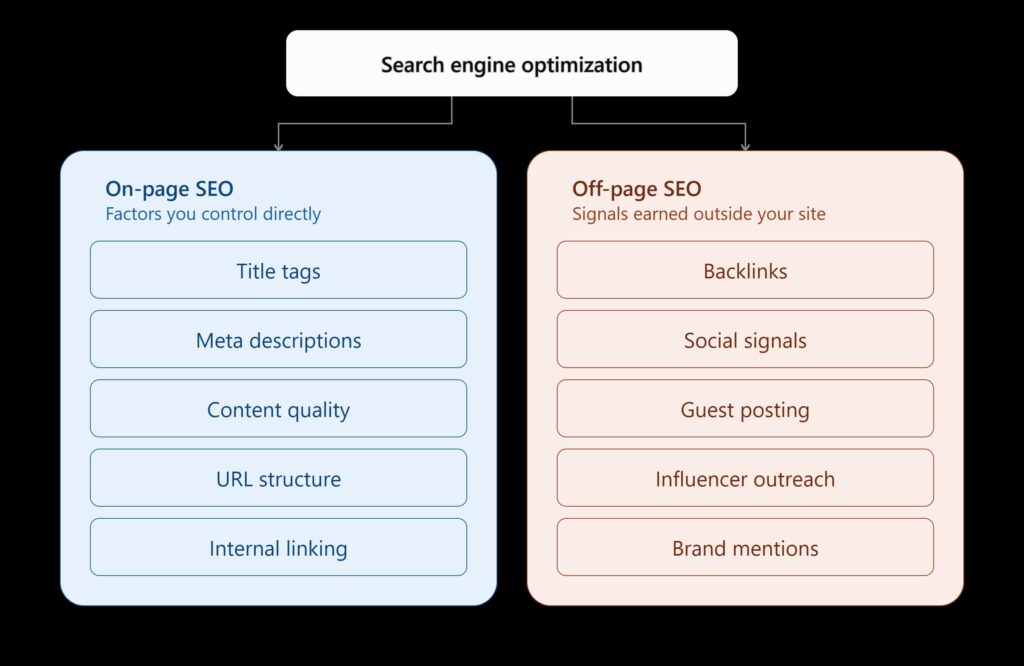
On-page SEO refers to the process of optimizing individual webpages to improve their visibility in search engine results and attract more relevant organic traffic. Unlike off-page SEO, which focuses on backlinks and external signals, on-page SEO deals entirely with elements you control on your own website.
These elements include:
- Content quality
- Keywords
- Title tags
- Meta descriptions
- URL structure
- Heading hierarchy
- Internal links
- Images
- Page speed
- Mobile responsiveness
- Schema markup
When these components work together, they create pages that are both user-friendly and search-engine friendly.
Why On-Page SEO Matters
Search engines aim to provide users with the most relevant and helpful results. Proper optimization helps Google understand:
- What your page is about
- Which keywords it should rank for
- Whether the content satisfies user intent
- How valuable your content is compared to competitors
Well-optimized pages also improve user engagement, increase average session duration, and reduce bounce rates.
On-Page SEO vs Off-Page SEO
| Feature | On-Page SEO | Off-Page SEO |
|---|---|---|
| Content Optimization | ✅ | ❌ |
| Title Tags | ✅ | ❌ |
| Meta Descriptions | ✅ | ❌ |
| Backlinks | ❌ | ✅ |
| Social Signals | ❌ | ✅ |
| Brand Mentions | ❌ | ✅ |
Both strategies are important, but on-page SEO should always come first because it creates the foundation for successful rankings.
Benefits of On-Page SEO
Proper on-page optimization delivers advantages that go beyond rankings.
Better Search Rankings
When your content matches search intent and follows SEO best practices, search engines can crawl and index it more effectively. This increases the likelihood of appearing for valuable keywords while improving your website’s overall authority.
Improved User Experience
Visitors appreciate websites that are easy to read, load quickly, and work seamlessly across devices. Better user experience often translates into higher engagement, lower bounce rates, and improved conversions.
Increased Organic Traffic
Higher rankings naturally bring more visitors without relying on paid advertising. Over time, consistent optimization creates a sustainable source of traffic that continues to grow.
Higher Click-Through Rates
Compelling title tags and well-written meta descriptions encourage users to click your result instead of a competitor’s, improving both traffic and visibility.
Complete On-Page SEO Checklist
Keyword Research
Everything begins with keyword research. Before writing content, identify the words and phrases your audience uses when searching online.
Look for:
- High search volume
- Moderate competition
- Strong search intent
- Relevant long-tail keywords
Instead of targeting only broad terms, combine primary and secondary keywords naturally throughout your content.
Use Primary and Secondary Keywords
For this article:
Primary Keyword:
- On Page SEO
Secondary Keywords:
- On Page SEO Checklist
- On Page Optimization
- SEO Optimization
- Website SEO
- SEO Best Practices
Use these naturally in headings, introductions, and throughout the article without overstuffing.
Optimize Title Tags
The title tag is often the first thing users see in search results, making it one of the most influential on-page SEO elements.
Best practices include:
- Keep titles between 50–60 characters.
- Place the primary keyword near the beginning.
- Make the title compelling and relevant.
- Avoid duplicate titles across pages.
Example:
On-Page SEO Checklist: 20 Proven Ways to Optimize Your Website
A strong title improves both rankings and click-through rates.
Write Meta Descriptions
Although meta descriptions are not a direct ranking factor, they significantly influence whether users click on your page.
An effective meta description should:
- Stay within 150–160 characters.
- Include the primary keyword naturally.
- Clearly explain what readers will gain.
- Encourage action with persuasive language.
Think of the meta description as your page’s advertisement in search results. A clear and engaging summary can make your listing stand out, even in competitive niches.
Use SEO-Friendly URLs
A clean URL structure makes it easier for both users and search engines to understand your page.
SEO-friendly URLs should:
- Be short and descriptive.
- Include the target keyword.
- Avoid unnecessary numbers or symbols.
- Use hyphens instead of underscores.
Simple URLs are easier to remember, share, and crawl, contributing to better usability and indexing.
Optimize Headings
Headings organize your content into logical sections and improve readability.
Follow these practices:
- Use one H1 per page.
- Structure content with H2, H3, and H4 tags.
- Naturally include keywords where relevant.
- Ensure headings accurately describe the content that follows.
A clear heading structure helps readers scan the page quickly and allows search engines to understand the hierarchy of your information.
Create High-Quality Content
High-quality content remains the most important aspect of on-page SEO. Focus on providing original, accurate, and valuable information that answers users’ questions comprehensively.
Aim to:
- Address search intent directly.
- Use clear, conversational language.
- Include examples, statistics, and practical tips.
- Keep content updated as information changes.
- Break long sections into digestible paragraphs.
Quality content not only ranks better but also encourages visitors to spend more time on your site and share your pages with others.
Continue writing please.
Continue writing please
Optimize Images
Images play a significant role in both user engagement and on-page SEO. A visually appealing webpage captures attention, breaks up large blocks of text, and helps explain complex ideas more effectively. However, uploading large, unoptimized images can slow down your website, negatively affecting both user experience and search rankings. Search engines cannot “see” images the way humans do, so they rely on file names, alt text, captions, and surrounding content to understand what an image represents. That’s why image optimization should never be overlooked.
Start by choosing high-quality images that are relevant to your content. Before uploading, compress image files using tools that reduce file size without sacrificing quality. Use descriptive file names such as on-page-seo-checklist.jpg instead of generic names like IMG12345.jpg. Add alt text that accurately describes the image while naturally incorporating your target keyword when appropriate. Modern image formats like WebP can significantly improve loading speed compared to traditional JPEG or PNG files.
Image Optimization Checklist
| Element | Best Practice |
|---|---|
| File Name | Use descriptive keywords |
| Alt Text | Clearly describe the image |
| Image Size | Compress before uploading |
| Format | Use WebP when possible |
| Responsive Images | Ensure images display properly on all devices |
| Lazy Loading | Load images only when users scroll to them |
Optimized images improve page speed, accessibility for visually impaired users, and the chances of appearing in Google Image Search, bringing additional organic traffic.
Internal Linking Strategy
Internal linking is one of the most powerful yet underutilized aspects of on-page optimization. Every internal link helps search engines discover new pages, understand your website structure, and distribute link equity across your site. Imagine your website as a city connected by roads. Without roads, reaching different destinations becomes difficult. Internal links serve as those roads, guiding both users and search engine crawlers from one page to another.
When creating internal links, always connect related articles naturally within the content. For example, if you’re discussing keyword research, linking to a detailed keyword research guide provides additional value to readers while strengthening your site’s SEO structure. Use descriptive anchor text instead of vague phrases like “click here.” Anchor texts such as SEO keyword research guide or technical SEO checklist provide better context for both users and search engines.
Avoid excessive internal links on a single page, as too many can dilute their value and overwhelm readers. Regularly audit your website to identify orphan pages—pages with no internal links pointing to them—as these are harder for search engines to discover. A thoughtful internal linking strategy improves navigation, increases page views, and encourages visitors to explore more of your content, ultimately boosting user engagement and SEO performance.
External Links
Many website owners hesitate to link to other websites, fearing they might lose visitors. In reality, linking to authoritative sources can strengthen your content’s credibility. Search engines recognize that citing reliable resources demonstrates thorough research and helps users access additional information when needed. External links show that your content is part of a broader web ecosystem rather than existing in isolation.
Only link to trustworthy, relevant websites with strong reputations. Government websites, educational institutions, respected industry blogs, and official company pages are generally excellent choices. Avoid linking to spammy or low-quality websites, as doing so may negatively affect your site’s credibility. Whenever referencing statistics, research studies, or expert opinions, provide proper attribution through external links.
Balance is important. Your content should primarily guide readers through your own website using internal links while occasionally referencing external sources to support important claims. This combination enhances both trustworthiness and user experience.
Improve Page Speed
Website speed is no longer just a convenience—it’s a ranking factor and a critical part of user satisfaction. Studies consistently show that users expect websites to load within a few seconds. If your pages are slow, visitors are likely to leave before reading your content, increasing bounce rates and reducing conversions. Fast-loading websites create a smoother experience, encouraging users to stay longer and engage with more pages.
Several factors influence page speed, including server response time, image sizes, unnecessary JavaScript, excessive CSS files, and poor hosting quality. Begin by compressing images, enabling browser caching, and minimizing CSS and JavaScript files. Using a Content Delivery Network (CDN) helps distribute website content across multiple servers, reducing loading times for users in different locations. Choosing reliable hosting can also make a noticeable difference.
Google’s Core Web Vitals emphasize loading performance, interactivity, and visual stability. Monitoring these metrics regularly helps identify opportunities for improvement. Even small speed enhancements can significantly impact user satisfaction, search rankings, and conversion rates. A faster website doesn’t just benefit SEO—it creates a better experience for every visitor.
Mobile Optimization
Today’s internet users increasingly browse websites on smartphones and tablets. Because of this shift, search engines now prioritize the mobile version of websites through mobile-first indexing. If your website performs poorly on mobile devices, your rankings may suffer even if the desktop version is excellent. Mobile optimization is no longer optional; it is essential for long-term SEO success.
A mobile-friendly website should automatically adjust its layout to fit different screen sizes. Buttons should be easy to tap, text should remain readable without zooming, and navigation should be simple and intuitive. Avoid intrusive pop-ups that cover important content, as these can frustrate users and negatively impact rankings. Test your website on multiple devices to ensure consistent performance across various screen sizes.
Loading speed becomes even more important on mobile networks, where internet connections may be slower than desktop broadband. Compress images, reduce unnecessary code, and optimize your website for touch interactions. A responsive design combined with fast loading creates a seamless browsing experience that satisfies both users and search engines.
Schema Markup
Schema markup is structured data added to your website’s code to help search engines better understand your content. While visitors usually don’t see schema directly, search engines use it to generate rich results, such as star ratings, FAQs, product information, recipes, and event details. These enhanced search listings often attract more clicks because they stand out visually in search results.
There are several types of schema markup depending on your content. Article schema is suitable for blog posts, Product schema for eCommerce pages, FAQ schema for frequently asked questions, and Local Business schema for businesses serving specific geographic areas. Implementing the correct schema increases the chances of your content appearing in enhanced search features, improving visibility and click-through rates.
Although schema markup does not directly boost rankings, it helps search engines interpret your pages more accurately. Combined with high-quality content and strong technical SEO, structured data contributes to a more comprehensive optimization strategy. As search engines continue evolving, schema markup is becoming an increasingly valuable component of modern on-page SEO.
Continue writing please. The next part will cover User Experience (UX), Core Web Vitals, Content Freshness, E-E-A-T, Common On-Page SEO Mistakes, Conclusion, and 5 FAQs to complete the 2,500+ word article.
Continue writing please
Enhance User Experience (UX)
A great on-page SEO checklist is incomplete without focusing on user experience (UX). Search engines aim to rank pages that satisfy users, and a positive browsing experience plays a significant role in achieving that goal. Think about your own online behavior. If you land on a website that is cluttered, difficult to navigate, or filled with intrusive ads, you are likely to leave within seconds. Search engines recognize these engagement signals and may reduce the visibility of pages that fail to meet user expectations.
Creating an excellent user experience starts with clean and intuitive website design. Use plenty of white space to improve readability, choose fonts that are easy to read, and organize content using descriptive headings and short paragraphs. Navigation should be simple so visitors can quickly find the information they need without unnecessary clicks. Clear calls-to-action (CTAs) also guide users toward the next step, whether it’s reading another article, subscribing to a newsletter, or making a purchase.
Accessibility is another important factor. Ensure your website is usable for everyone, including visitors with disabilities. Add descriptive alt text to images, maintain sufficient color contrast, and make navigation possible using a keyboard. These improvements benefit all users while aligning with search engines’ goal of delivering high-quality, accessible content. A website that provides an exceptional user experience encourages visitors to stay longer, interact more, and return in the future.
Monitor Core Web Vitals
Google introduced Core Web Vitals as a set of performance metrics that measure real-world user experience. These metrics focus on three key aspects: loading performance, interactivity, and visual stability. Improving these signals not only enhances user satisfaction but can also positively influence search rankings.
The three Core Web Vitals are:
| Metric | What It Measures | Goal |
|---|---|---|
| Largest Contentful Paint (LCP) | Loading performance | Under 2.5 seconds |
| Interaction to Next Paint (INP) | Responsiveness | Under 200 milliseconds |
| Cumulative Layout Shift (CLS) | Visual stability | Under 0.1 |
Improving these metrics involves optimizing server performance, reducing unnecessary JavaScript, compressing images, using efficient CSS, and reserving space for images and advertisements to prevent layout shifts. Regularly monitor Core Web Vitals using tools such as Google Search Console and PageSpeed Insights to identify issues before they impact rankings.
Fast, stable websites create trust and provide a smoother experience for visitors. Even if your content is outstanding, poor performance can discourage users from engaging with it. Prioritizing On-page SEO Core Web Vitals ensures your technical SEO supports your content strategy.
Keep Content Fresh and Updated
Publishing an article once is not enough. Search engines favor content that remains relevant, accurate, and useful over time. Industries evolve, statistics change, and best practices are updated regularly. Refreshing your content demonstrates that your website is actively maintained and committed to providing reliable information.
Review your important pages every few months. Update outdated statistics, replace broken links, add new examples, and expand sections that could provide additional value. You may also include recently introduced SEO practices or algorithm updates to keep your content competitive. Even small improvements can significantly enhance a page’s performance.
Content freshness also encourages repeat visits. Readers are more likely to trust a website that consistently provides up-to-date information rather than outdated advice. By treating every article as a living resource instead of a one-time publication, you increase its long-term value for both users and search engines.
Build Trust with E-E-A-T
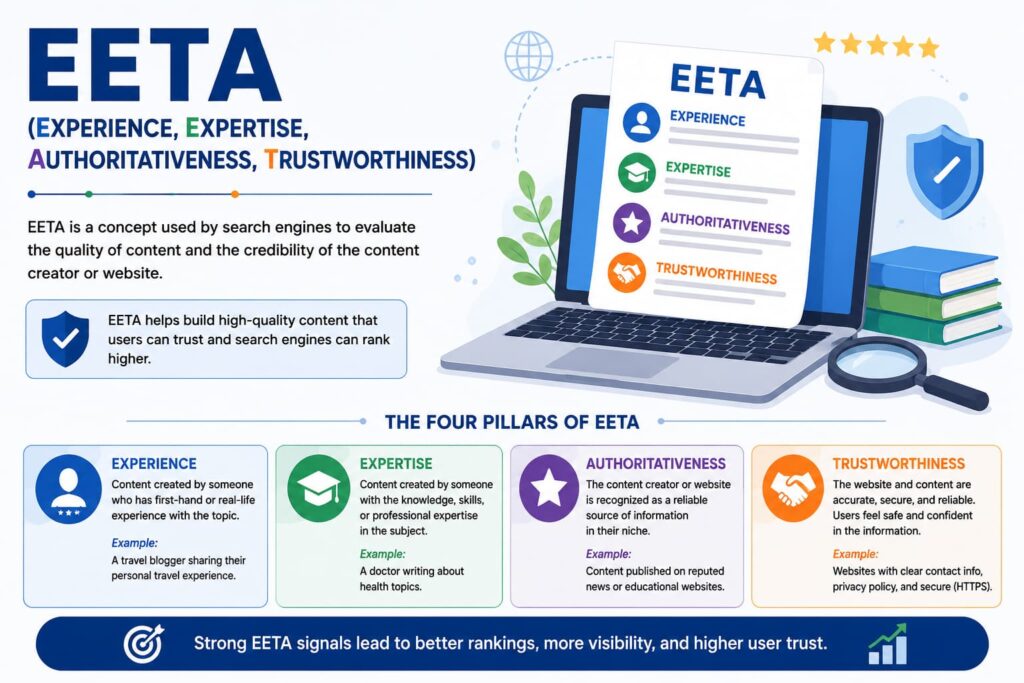
Google emphasizes Experience, Expertise, Authoritativeness, and Trustworthiness (E-E-A-T) when evaluating content quality. While E-E-A-T is not a direct ranking factor,On-page SEO it influences how search engines assess the credibility of your website, particularly in competitive or sensitive industries.
Demonstrate experience by sharing practical insights, real-world examples, and firsthand knowledge whenever possible. Showcase expertise by providing accurate, detailed information supported by reliable sources. Build authoritativeness through consistent publication of high-quality content and earning mentions from respected websites. Finally, establish trustworthiness by displaying clear contact information, secure HTTPS encryption, transparent policies, and accurate author profiles.
Readers naturally trust websites that appear professional and reliable. High-quality content supported by credible references creates confidence and encourages visitors to return. Over time, this trust contributes to stronger brand recognition and improved organic visibility.
Common On-Page SEO Mistakes to Avoid
Even experienced website owners sometimes overlook essential optimization practices. Avoiding common mistakes can significantly improve your SEO performance.
Some of the most frequent on-page SEO mistakes include:
- Keyword stuffing instead of writing naturally.
- Using duplicate title tags and meta descriptions.
- Publishing thin or low-quality content.
- Ignoring mobile optimization.
- Uploading large, uncompressed images.
- Creating broken internal links.
- Forgetting image alt text.
- Using multiple H1 headings on one page.
- Neglecting page speed optimization.
- Failing to update outdated content.
SEO is not about manipulating search engines;On-page SEO it is about creating the best possible experience for users. Regular audits help identify these issues before they affect rankings and traffic.
Conclusion
On-page SEO remains one of the most effective ways to improve your website’s search visibility, attract qualified visitors, and create a better experience for users. Every optimization—from writing compelling title tags and creating high-quality content to improving page speed and implementing schema markup—contributes to stronger search performance. Rather than viewing SEO as a one-time task, think of it as an ongoing process of continuous improvement.
Following a structured on-page SEO checklist ensures that every page you publish is optimized for both readers and search engines. Small improvements made consistently often deliver significant long-term results. As search algorithms continue to evolve, websites that prioritize helpful content, technical excellence, and user satisfaction will remain competitive.
Whether you’re launching a new website or improving an existing one, implementing these on page optimization techniques will help build a stronger online presence, increase organic traffic, and support sustainable growth.
Frequently Asked Questions (FAQs)
1. What is on-page SEO?
On-page SEO is the process of optimizing individual web pages by improving elements such as content, keywords, title tags, meta descriptions, URLs, headings, images, internal links, and page speed to help search engines understand the page and rank it higher.
2. Why is on-page SEO important?
On-page SEO improves search visibility, enhances user experience, increases organic traffic, and helps search engines understand your content more effectively, leading to better rankings and higher engagement.
3. How often should I update my on-page SEO?
Review your important pages every three to six months. Update outdated information, improve content quality, fix broken links, optimize new keywords, and ensure technical SEO elements remain current.
4. What is the difference between on-page SEO and off-page SEO?
On-page SEO focuses on optimizing elements within your website, such as content and HTML tags. Off-page SEO involves activities outside your website, including backlink building, brand mentions, and social media signals.
5. What is the most important factor in on-page SEO?
High-quality content that satisfies user intent is the most important factor. Supporting elements such as keyword optimization, page speed, mobile responsiveness, internal linking, and schema markup work together to maximize SEO performance.